
Overview
Cross-platform desktop interface for ZeroTrace device management
ZeroTrace Desktop
The ZeroTrace Desktop App provides a unified interface to manage and control ZeroTrace devices via COM port connectivity.
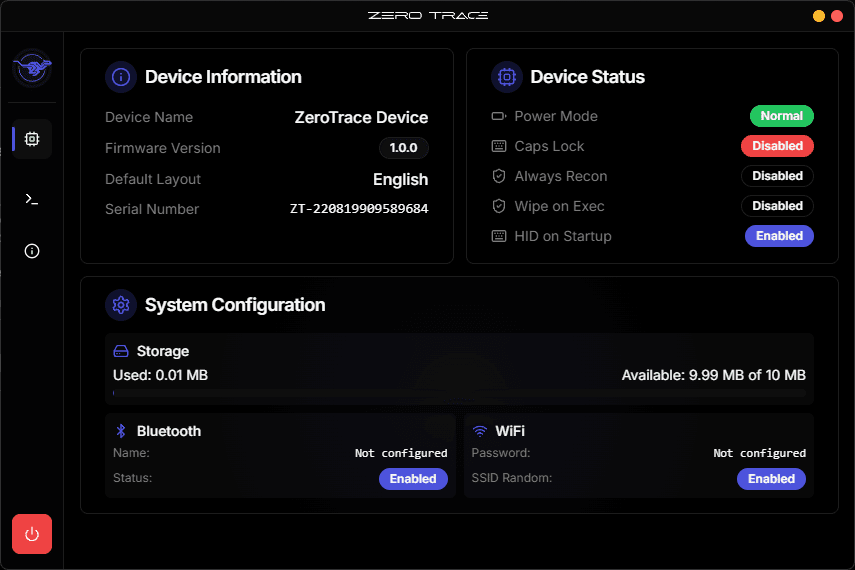
Key Features
- Device Dashboard - Real-time status and metrics
- Terminal Interface - Direct device control
- Cross-platform - Windows, macOS, Linux
- COM Port Support - USB serial communication
System Requirements
| Requirement | Details |
|---|---|
| OS | Windows 10+, macOS 10.15+, Linux (Ubuntu 20.04+) |
| RAM | 2GB minimum, 4GB+ recommended |
| Storage | 200MB available space |
| Connection | USB with COM port driver |
Supported Devices
- ZeroTrace HID
- ZeroTrace BLE Logger
- Any device with COM port interface
Not Supported
- Devices without COM port - Serial interface required
- ZeroTrace Mini - No COM port connectivity
- Lilygo T-Dongle S3 - No COM port connectivity
Use the Web UI for these devices instead.
Next Steps
- Installation - Get started quickly
- Dashboard - Device monitoring interface
- Terminal - Command reference